






The Bonree ONE Sage AI Operations Agent Workbench is an intelligent operations hub built on Bonree’s observability platform. It transforms expert tuning experience into structured analytical workflows, shifting abnormal SQL diagnosis from “human guessing” to “AI-proven evidence.”
1. Why are “slow but working” SQL queries more painful than errors?
In production environments, what causes the most trouble is often not obvious failures, but SQL queries that “run successfully but perform poorly.” These queries are silent under normal conditions, but once exposed to high-frequency calls or growing data volumes, they can gradually slow down the entire service call chain.
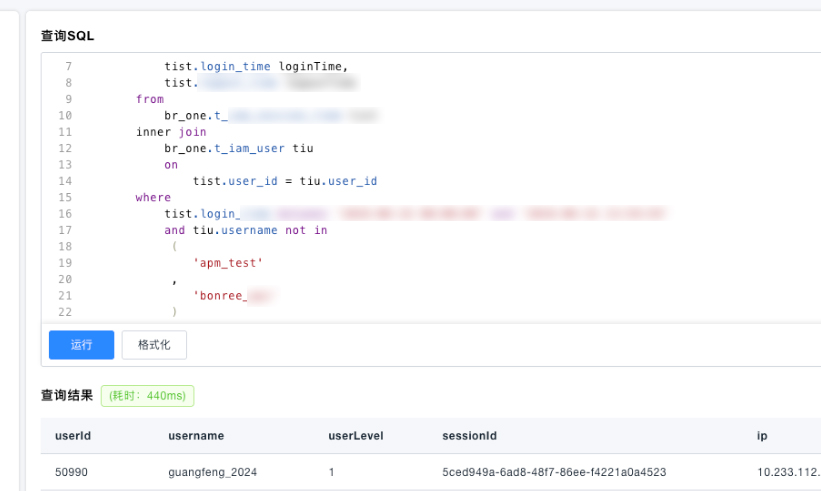
Below is a real-world slow query: a multi-table aggregation SQL containing a LEFT JOIN, with a single execution time of 0.605 seconds. While this may seem acceptable at first glance, it becomes a significant performance bottleneck under repeated execution.
In the past, diagnosing such issues required engineers to manually inspect execution plans and infer root causes line by line—time-consuming and heavily dependent on personal experience. This time, we handed it over to Bonree ONE’s Sage AI.

2. How does Sage AI turn ambiguous slow queries into structured diagnostics?
Sage AI’s structured analysis engine does not rely on manual inference. Instead, it completes a closed-loop workflow consisting of syntax and semantic analysis, rule matching, root cause hypothesis, and optimization recommendations.
Rather than giving a vague suggestion like “add an index,” Sage AI provides a structured analysis process.
Step 1: Syntax and semantic analysis
It detects that the WHERE clause applies aNOT INfilter ontiu.usernamein the right table. This is critical: it implies that the original LEFT JOIN has effectively degraded into an INNER JOIN, making the null-preserving behavior of LEFT JOIN unnecessary and inefficient.Step 2: Rule matching list
Sage AI matches internal optimization rules one by one and assigns evidence levels. Rule AP-305 precisely identifies the JOIN semantic issue described above, while AP-302 points out missing indexes on the join columns.Step 3: Root cause hypothesis
Based on the evidence, it generates a root cause hypothesis.Step 4: Actionable recommendations
It provides two actionable optimization suggestions:P0 level: Replace LEFT JOIN with INNER JOIN to remove semantic ambiguity.
P1 level: Create a composite index on
login_timeanduser_idin thet_iam_session_timetable to avoid full table scans.
Each recommendation includes expected performance gain, implementation cost, and regression risk—making it clear whether and how it should be applied.
3. How does adding execution plans and DDL upgrade analysis from “inference” to “proof”?
By adding EXPLAIN execution plans and DDL statements, Sage AI elevates its analysis from rule-based inference to evidence-based reasoning, increasing the confidence level of optimization recommendations to production-grade reliability.
To go deeper, you can provide two additional inputs:
SQL execution plan (EXPLAIN)
Table schema definitions (DDL)
With the execution plan, Sage AI can determine the actual database access path—whether it is a full table scan (type=ALL), index usage, estimated row counts, or whether temporary tables and file sorting are triggered.
With the DDL, it can verify column types, existing indexes, and data scale, and assess whether a proposed composite index would be ineffective due to column order or low selectivity.
With both inputs combined, the analysis shifts from rule-based inference to execution-path validation, making optimization recommendations far more precise and production-ready.
4. What is the real impact after optimization?
After implementing Sage AI’s P0 and P1 recommendations, query performance improved by 60×, fully validating the practical value of structured analysis in AI-driven observability scenarios.
We applied the recommended changes:
Refactored JOIN semantics
Added missing indexes
Further optimized derived tables by pre-aggregating before JOIN to reduce intermediate result size
After optimization, the query execution time dropped from 0.605 seconds to 0.01 seconds, achieving approximately a 60× performance improvement.
5. Conclusion: How does Sage AI empower every engineer to become a DBA?
The core value of the Bonree ONE Sage AI Operations Agent Workbench is transforming SQL tuning from an “expert craft” into a “platform capability,” enabling a closed-loop workflow of diagnosis, recommendation, and validation within the agent workspace.
Looking back at the entire process, no one manually inspected execution plans or guessed root causes line by line. Sage AI clearly explained:
why the query is slow
where it should be optimized
what risks are involved after changes
Engineers only need to make decisions and validate results.
For teams handling hundreds or thousands of SQL queries daily, this means encapsulating expert-level tuning experience—previously hard to replicate—into a readily available platform capability, enabling every engineer to operate like an experienced DBA when diagnosing and fixing abnormal SQL.
Last Updated: June 16, 2026 · Bonree ONE 4.0.0.7
Version Note: This article is based on Bonree ONE version 4.0.0.7 (updated June 16, 2026). This release includes synchronized upgrades across Sage AI Intelligent Operations Workbench, APM, RUM, SDK, Alert, Analysis, Event, CMDB, ETL, IAM, and other capability modules.