





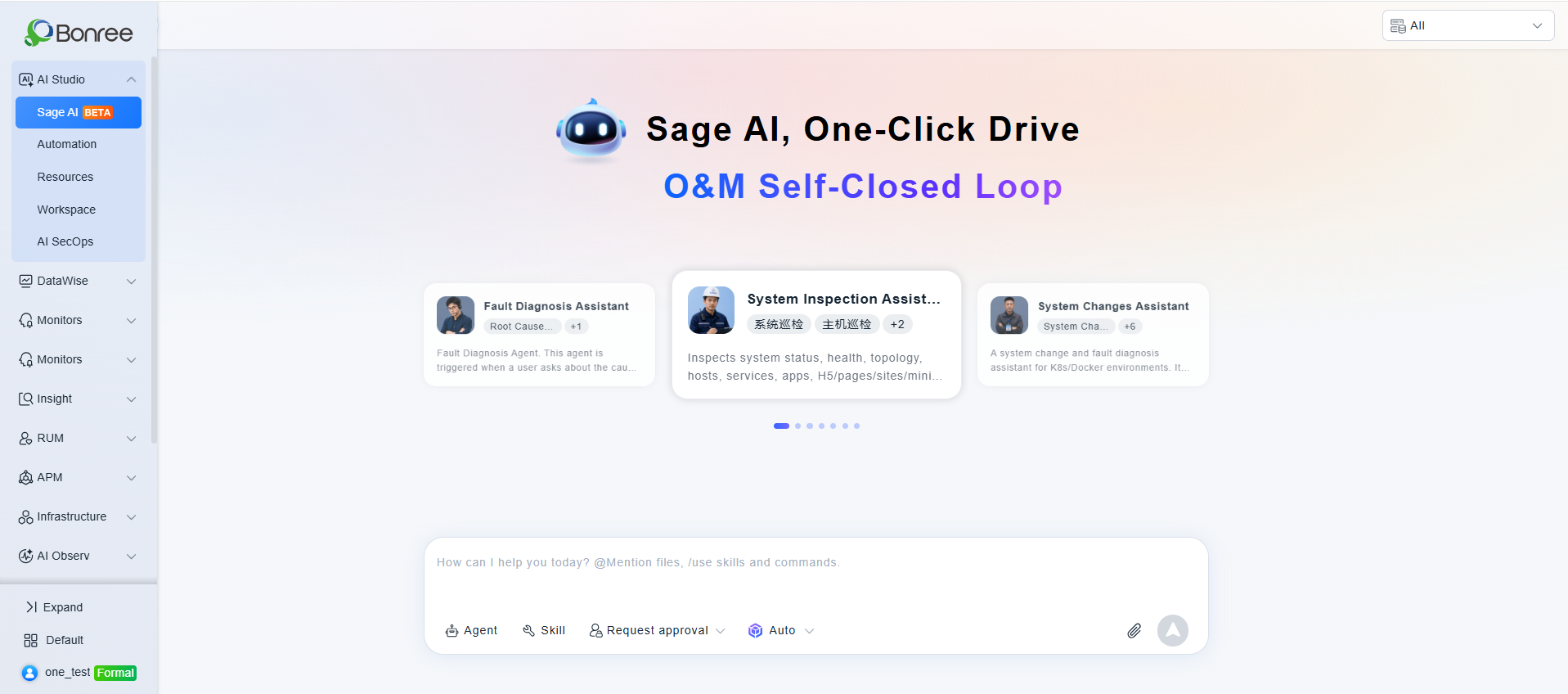
Summary: Bonree ONE · Sage AI is the agentic AIOps hub of the Bonree ONE observability platform, a unified control plane for models, tools, skills, and knowledge bases that governs AI agents across their full lifecycle, from build to production operation. At the core of Sage AI's agentic operations capability is a simple idea: a single natural-language instruction, typed once into a chat window, becomes a recurring, self-healing, fully auditable operations task, with no scripting and no scheduler configuration required. This post walks through that transformation using a daily host-inspection request as a worked example, and breaks down the four mechanisms that make agent-driven automation production-grade.
The problem agentic AIOps is meant to solve
In a conventional operations workflow, even a modest requirement, such as "inspect production hosts every morning at 8 AM," typically forces a team through several manual stages: writing an inspection script, learning cron syntax, deploying the scheduled job, and validating that it actually fires as expected. Each of those stages is a place where automation initiatives stall out, and each one adds toil that has nothing to do with the actual operational goal.
This is precisely the gap agentic operations is designed to close: instead of engineers translating intent into scripts and schedulers by hand, an AI agent takes the intent directly and handles the translation itself. In Bonree ONE · Sage AI, the entry point is a single sentence typed into the chat interface:
"Inspect production hosts, covering the last 24 hours, with a focus on CPU and disk utilization, and run this every day at 8 AM."
From that one instruction, Sage AI's agentic operations layer produces a task with scheduled triggering, automatic retry-on-failure, and a complete execution history: no script, no cron expression, no manual deployment step. Four coordinated mechanisms make that possible.
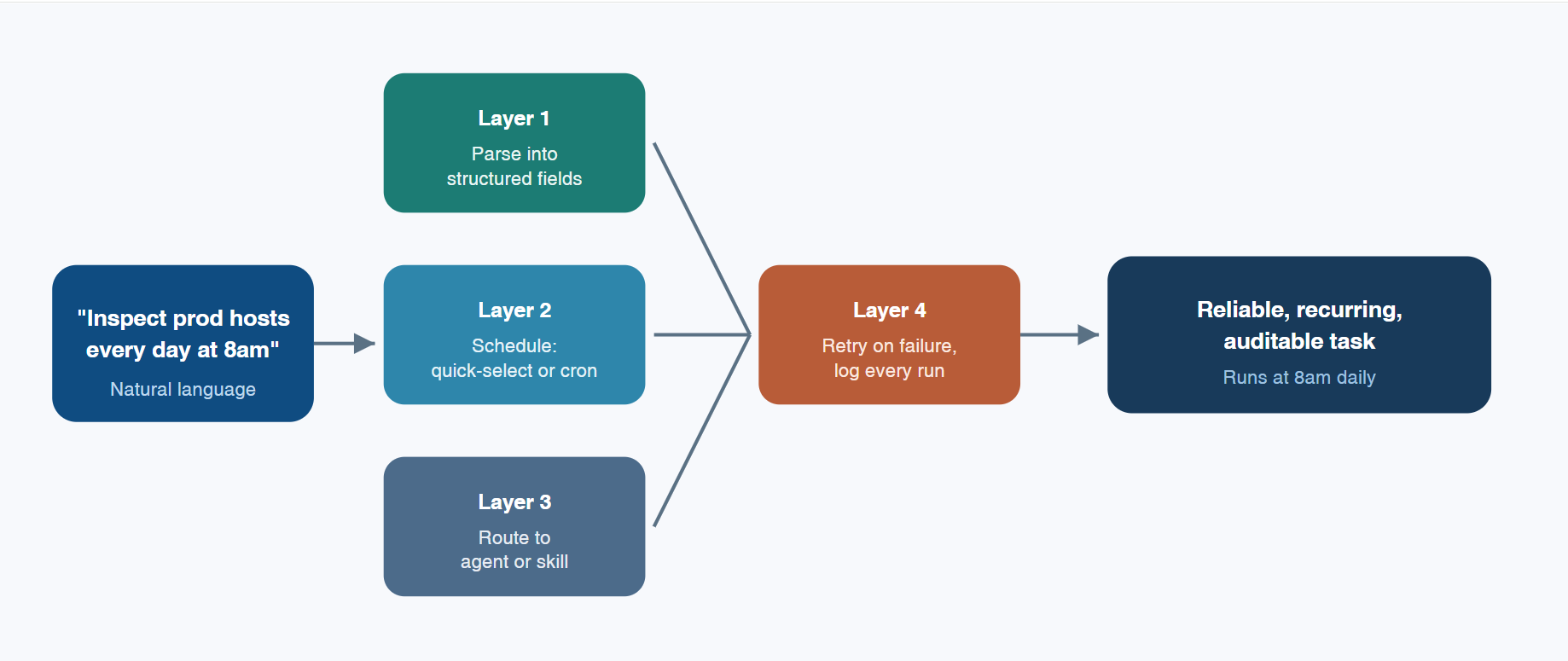
Layer 1: Parsing natural language into a structured agent task
Sage AI doesn't persist the raw sentence as-is. Once the user finishes describing the requirement, a confirmation screen decomposes it into explicit, editable fields for review:
● Task name — a human-readable label, e.g., "Daily Host Inspection."
● Task prompt — the operative instruction. On every scheduled trigger, this exact text is re-submitted into Sage AI's standard conversational pipeline, so the automated run is processed through the identical reasoning path as a manually typed request — this is what keeps agentic execution consistent and predictable, not just fast.
● Execution frequency — the specific trigger schedule, committed to the automation plan.
● Retry policy — retry count and interval. Even if the user doesn't specify one, the platform falls back to sensible defaults.
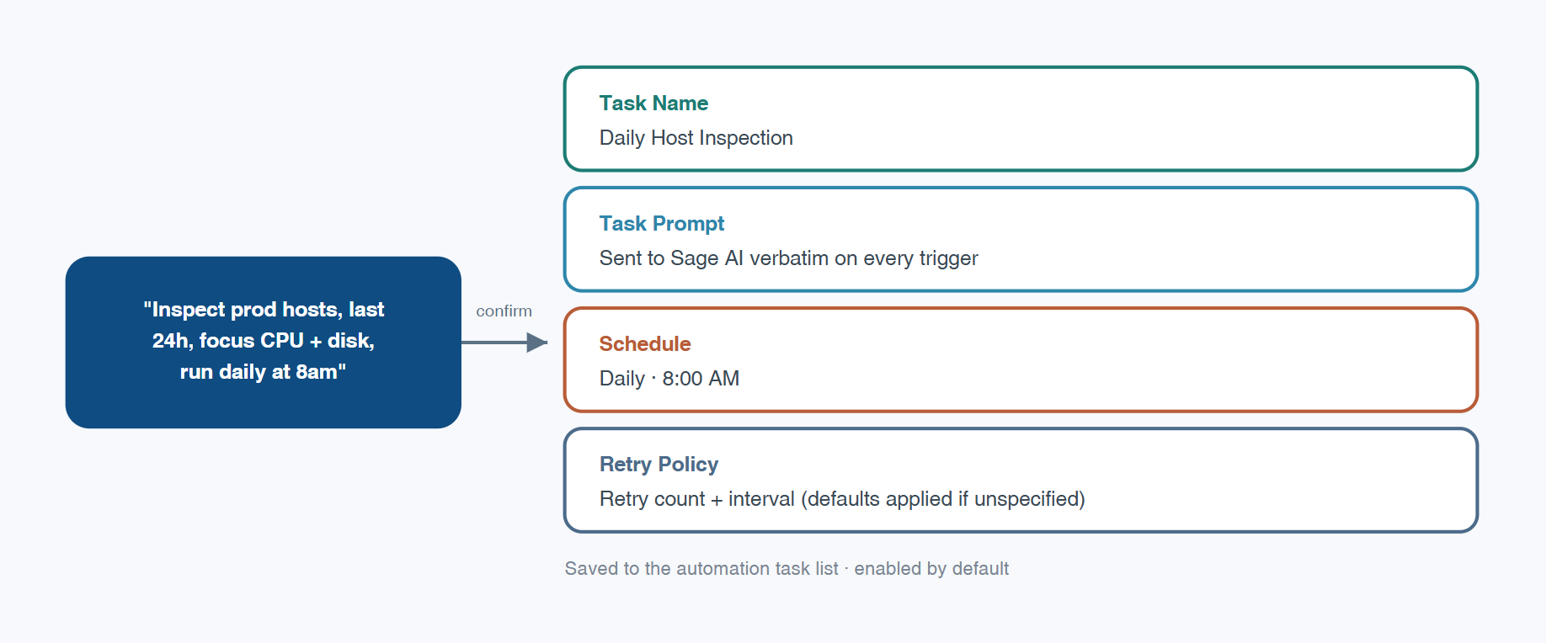
Once confirmed, the task is written to the automation task list for the current resource domain (the scoped workspace the task belongs to), enabled by default. Intent capture and task configuration happen in a single interaction. Teams that prefer to plan automations up front rather than describe them conversationally can configure the same fields directly under AI Workbench > Automation. Both paths converge on an identical result, which is the point: the conversational route is a shortcut, not a separate, lesser feature.
Layer 2: Two scheduling models, matched to complexity
"Every day at 8 AM" is about as simple as scheduling gets, so it's handled through quick-select: daily, hourly, weekly, or monthly cadences paired with a specific time. No scheduling syntax to learn.
More elaborate patterns — "every 20 minutes between 9 and 11 AM on Monday, Wednesday, and Friday" — don't map cleanly onto a dropdown. For those, Sage AI exposes Cron expressions, capable of describing scheduling logic of arbitrary complexity. Simple requirements stay simple to configure; complex ones get a precise, purpose-built tool. The two models coexist rather than forcing every use case through a single interface, a deliberate design choice that keeps agentic operations approachable for simple tasks without lowering the ceiling for advanced ones.
Layer 3: Routing the task to the right agent
Once a task fires, Sage AI still has to resolve which capability actually executes it: which agent or skill. This is governed by an execution subject setting (the field that determines who runs the task) with three modes:
● Auto-match (default): the platform performs semantic routing, resolving the prompt to the matching agent or skill.
● Specify Agent: the task is pinned to one published agent — for instance, always routing inspection requests to a dedicated System Inspection Agent.
● Specify Skill: the task is pinned to one published skill instead.
Auto-match isn't an ad hoc judgment call made on the fly by the model. It follows an explicit, deterministic rule set. For a system-inspection task, the routing logic requires the prompt to contain both an action-type keyword (inspect, scan, check, troubleshoot, execute, view, analyze) and an object-type keyword (system, running status, health status, host, server, service, process, port, application). Only when both keyword categories are present does the request route to the System Inspection Agent. Reword the request to "analyze this slow SQL query," and it instead resolves to the Database Analysis Expert. Sage AI currently ships seven built-in agent categories (fault analysis, system inspection, platform operations, database analysis, intelligent customer service, capacity assessment, and system change management), each governed by its own routing boundary. In short, auto-match performs semantic classification first and hands off execution second; this is what makes multi-agent operations tractable at scale rather than a black box.
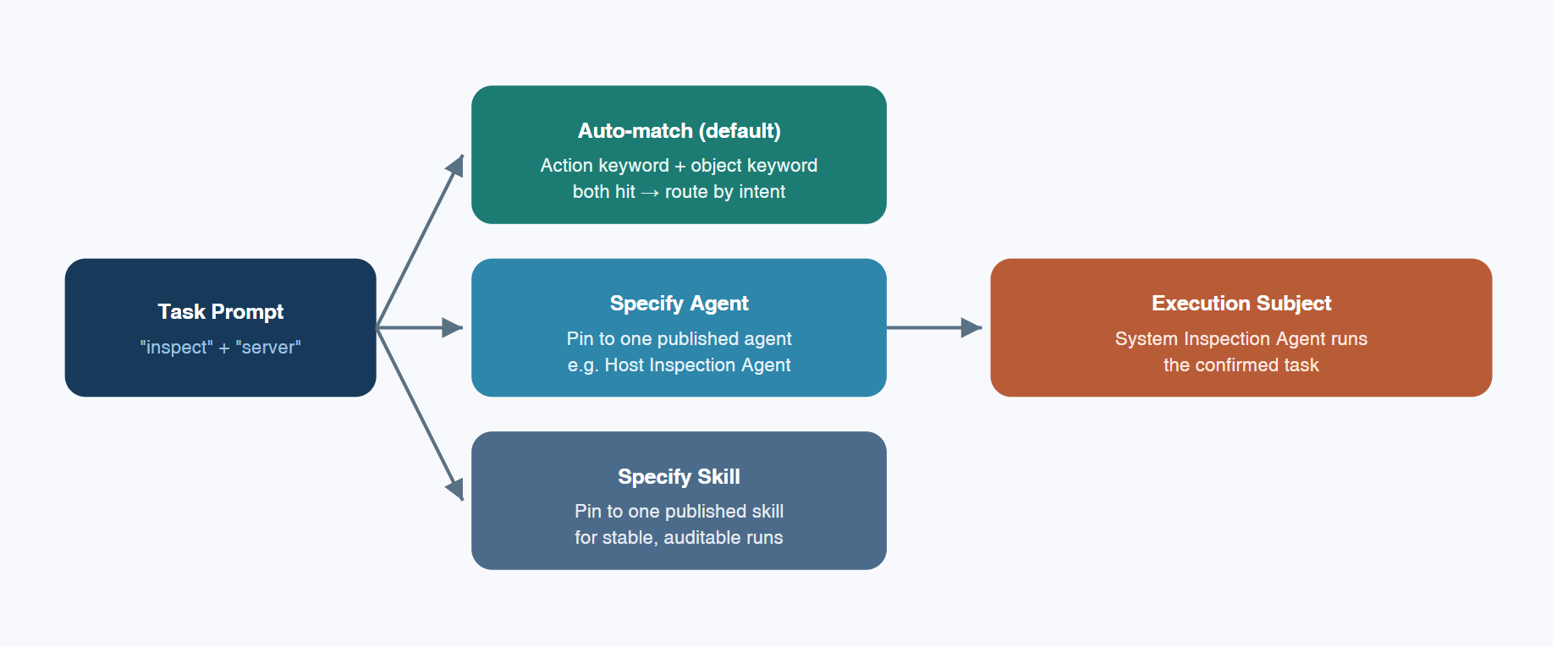
Pinning a task to a specific agent or skill trades some of that flexibility for stability and auditability: once bound, the task card surfaces the exact execution subject, so on-call engineers can pinpoint the responsible component immediately during an incident review. One operational nuance worth flagging: if a pinned agent or skill is later promoted to a new published version, the automation transparently switches to that new version on its next run. Version churn on the capability side propagates directly to already-configured automations. It's worth factoring into your change-management process for agentic operations, the same way you'd review a dependency bump in any production pipeline.
Layer 4: Failure handling, retries, and audit trails
Every task execution generates a full record: start time, end time, duration, token consumption, execution status, and execution type.
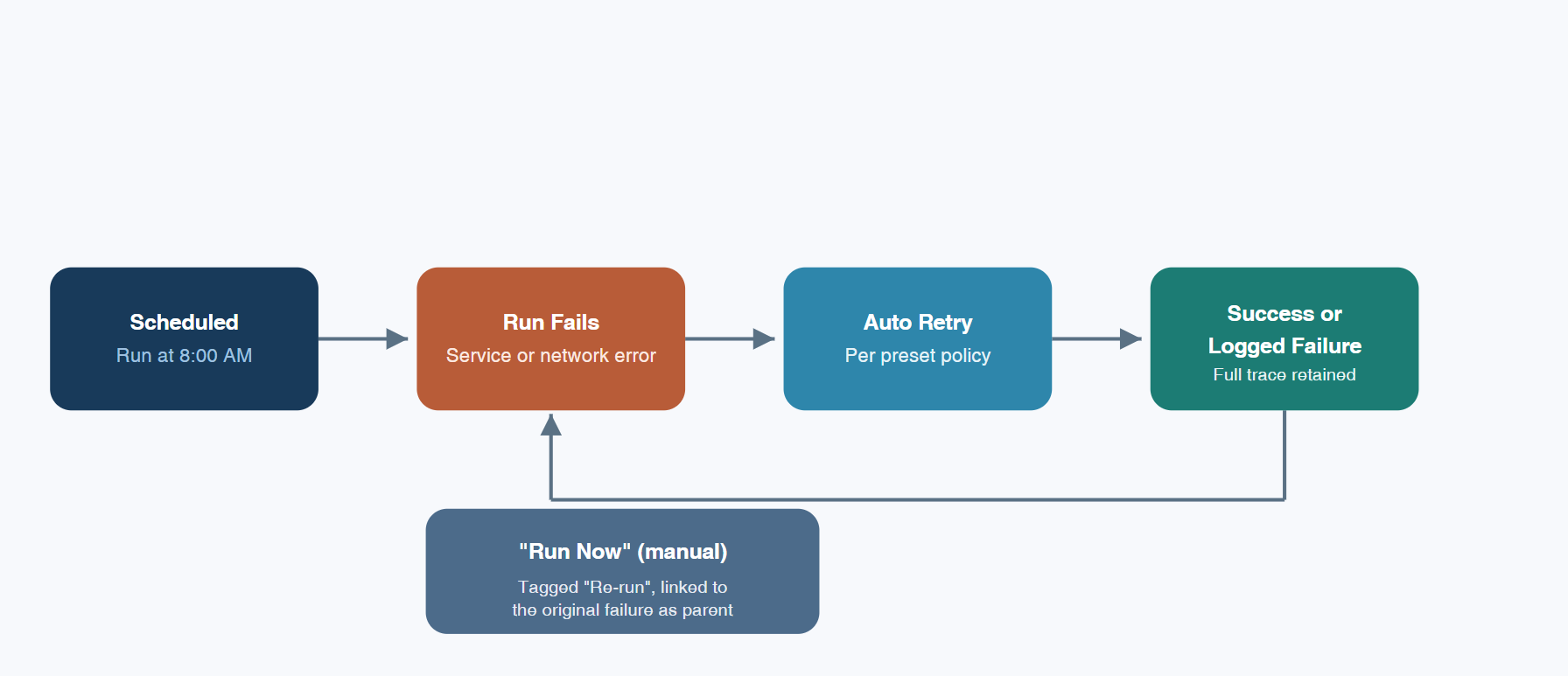
If a run fails, say a downstream dependency blip or transient network loss, Sage AI automatically retries according to the preset retry policy, completing a first round of self-healing without human intervention. If the retries are exhausted and the task still fails, the failure record is preserved in full: opening "View Session" reconstructs the complete reasoning trace and tool-call history for that run, so the failure point is traceable rather than opaque.
Operators don't have to wait out the retry policy to validate a fix. The task card's "Run Now" action bypasses the scheduled cadence and triggers an immediate re-run on demand. Manually triggered runs of this kind are tagged "Re-run" and linked to the originating failure as a parent-child pair, so the execution log preserves lineage ("this re-run traces back to that specific failure") instead of surfacing a flat, disconnected list of events. For teams running agentic operations at scale, that lineage is what turns an execution log into an actual audit trail.
Why this matters for agentic operations at scale
"Run an inspection every day at 8 AM" reads like a trivial request. What makes it reliable in a live production environment is the coordination of four distinct mechanisms: natural-language parsing into a structured task, flexible scheduling, semantic routing to the correct agent, and a retry-and-audit system built to survive real-world failure modes. That combination is the actual design target behind Sage AI's automation layer — not simply "run this on a timer," but "run this on a timer, keep running it correctly as agents and conditions change, and retain a complete record of what happened." That's the bar agentic AIOps has to clear to be trusted in production, not just in a demo.
Where this fits relative to conventional AIOps tooling
Most established AIOps platforms, including Dynatrace's Davis AI and Datadog's Watchdog, are built primarily around anomaly detection, correlation, and alert-noise reduction: once configured, they watch metrics and logs and flag or explain deviations automatically. What Sage AI's agentic operations layer adds is a different starting point, not necessarily a different endpoint: instead of setting up detection rules, integration pipelines, or dashboards to get to that automated state, the operator describes the task in a sentence, and the agent produces the schedule, retry policy, and routing configuration directly. It's a difference in how the automation gets configured, worth noting on its own terms rather than as a blanket claim of superiority.
FAQ
What is Bonree ONE · Sage AI? It's the agentic AIOps hub inside the Bonree ONE observability platform: a unified layer for models, tools, skills, and knowledge bases that manages AI agents from initial build through ongoing production operation.
What is agentic operations, in this context? It's an operations model where AI agents — not static scripts — interpret an operator's intent, decide how to execute it, and carry out the task end to end, including scheduling, execution, error recovery, and audit logging.
Do I need to know Cron syntax to schedule a task? No. Common, simple schedules (daily, hourly, weekly, or monthly at a fixed time) use a quick-select interface. Cron expressions remain available for complex, multi-condition schedules.
How does Sage AI decide which agent handles a scheduled task? By default, through semantic auto-matching driven by keyword rules — for example, an inspection task must contain both an action keyword and an object keyword before it routes to the System Inspection Agent. Operators can also bypass auto-match entirely by pinning a task to a specific agent or skill.
What happens if a scheduled task fails? Sage AI retries automatically based on a configurable retry policy. If the task still fails after retries are exhausted, the complete failure record — including the reasoning trace and tool calls — is preserved for troubleshooting, and operators can trigger an immediate "Run Now" re-run that stays linked to the original failure for full traceability.